誕生:3つの生命体に囲まれた場所には生命が誕生して増える。(食べ物に余裕があると増える)
| ○ | ○ | ○ |
| ○ | ||
| ○ | ||
| ○ |
維持:2つか3つの生命体に囲まれた場所にいる生命体は生き残る。(食べ物が生命を維持出来るだけある)
| ○ | ○ | ○ |
| ○ | ||
| ○ | ||
| ○ | ||
| ○ |
| ○ | ○ | |
| ○ |
死滅:それ以外の生命体は死ぬ。(多すぎると食べ物が不足するし、少ないと繁殖できない)
| ○ | ○ | ○ |
| ○ | ○ | |
| ○ | ||
| ○ | ○ | |
生命のいるセルを"●"、いないセルを"・"で表しています。
import java.awt.*;
import java.awt.event.*;
import javax.swing.*;
import javax.swing.Timer;
import javax.swing.text.StyleConstants;
import javax.swing.text.MutableAttributeSet;
import javax.swing.text.SimpleAttributeSet;

/** javax.swing.Timerを使って
 * JTextArea text; -> JTextPane text; */
public class Life extends JFrame implements ActionListener{
    String alive = "●"; //●が全角にならないシステムでは☀など別の文字を
    String dead  = "・";
    int ct = 0;
    String[] now = {
            "・・・・・・・・・・・・・・・・・・・・・・・・・・・・・・・・・・・・・・・・",
            "・・・・・・・・・・・・・・・・・・・・・・・・・・・・・・・・・・・・・・・・",
            "・・・・・・・・・・・・・・・・・・・・・・・・・・・・・・・・・・・・・・・・",
            "・・・・・・・・・・・・・・・・・・・・・・・・・・・・・・・・●・・・・・・・",
            "・・・・・・・・・・・・・・・・・・・・・・・・・・・・・・・・●・・・・・・・",
            "・・・・・・・・・・・・・・・・・・・・・・・・・・・・・・・・●・・・・・・・",
            "・・・・・・・・・・・・・・・・・・・・・・・・・・・・・・・・●・・・・・・・",
            "・・・・・・・・・・・・・・・●●●●●・・・・・・・・・・・・●・・・・・・・",
            "・・・・・・・・・・・・・・・・・・・・・・・・・・・・・・・・・・・・・・・・",
            "・・・・・・・・・・・・・・・・・・・・・・・・・・・・・・・・・・・・・・・・",
            "・・・・・・・・・・・・・・・・・・・・・・・・・・・・・・・・・・・・・・・・",
            "・・・・・・・・・・・・●・・・・・・・・・・・・・・・・・・・・・・・・・・・",
            "・・・・・・・・・・・●・・・・・・・・・・・・・・・・・・・・・・・・・・・・",
            "・・・・・・・・・・・●●●・・・・・・・・・・●・・・・●・・・・・・・・・・",
            "・・・・・・・・・・・・・・・・・・・●●●●●●●●●●●●●●●●・・・・・",
            "・・・・・・・・・・・・・・・・・・・・・・・・・・・・・・・・・・・・・・・・",
            "・・・・・・・・・・・・・・・・・・・・・・・・・・・・・・・・・・・・・・・・",
            "・・・・・・・・・・・・・・・・・・・・・・・・・・・・・・・・・・・・・・・・",
            "・・・・・・・・・・・・・・・・・・・・・・・・・・・・・・・・・・・・・・・・",
            "・・・・・・・・・・・・・・・・・・・・・・・・・・・・・・・・・・・・・・・・",
            "・・・・・・・・・・・・・・・・・・・・・・・・・・・・・・・・・・・・・・・・",
            "・・・・・・・・・・・・・・・・・・・・・・・・・・・・・・・・・・・・・・・・",
            "・・・・・・・・・・・・・・・・・・・・・・・・・●●●●●・・・・・・・・・・",
            "・・・・・・・・・・・・・・・・・・・・・・・・・・・・・・・・・・・・・・・・",
            "・・・・・・・・・・・・・・・・・・・・・・・・・・・・・・・・・・・・・・・・",
            "・・・・・・・・・・・・・・・・・・・・・・・・・・・・・・・・・・・・・・・・",
            "・・・・・・・・・・・・・・・・・・・・・・・・・・・・・・・・・・・・・・・・",
            "・・・・・・・・・・・・・・・・・・・・・・・・・・・・・・・・・・・・・・・・",
            "・・・・・・・・・・・・・・・・・・・・・・・・・・・・・・・・・・・・・・・・",
            "・・・・・・・・・・・・・・・・・・・・・・・・・・・・・・・・・・・・・・・・"
            };
    String[] nxt = new String[now.length];;
    JTextPane text;
    JButton btn;
    Timer timer;
    public Life() {
        setDefaultCloseOperation(EXIT_ON_CLOSE);
        String initlife = "";
        for(int y=0; now.length>y; y++){
            initlife += now[y]+"\n";
        }
        initlife += "世代数:0";
        text =  new JTextPane();
        SimpleAttributeSet sas = new SimpleAttributeSet();
        StyleConstants.setFontSize(sas, 16);
        StyleConstants.setLineSpacing(sas, -0.2f);
        text.setParagraphAttributes(sas, true) ;
        text.setText(initlife);

        btn = new JButton("start");
        setLayout(new BorderLayout());
        add(text, BorderLayout.CENTER);
        add(btn, BorderLayout.SOUTH);
        btn.addActionListener(this);
        timer = new Timer(400 , this);
        pack();
        setVisible(true);
    }
    @Override
    public void actionPerformed(ActionEvent e) {
        if (e.getSource() == btn) {
            if ( timer.isRunning() ){
                timer.stop();
                btn.setText("start");
            }else{
                btn.setText("stop");
                timer.start();
            }
        }
        else{
            ct++;
            //System.out.printf("世代数:%d\n",ct);
            setNext();
            textDisp(ct);
        }
    }
    public static void main( String[] args ) {
        Life life = new Life();
    }
    public void setNext(){
        int jb,ib,je,ie,alivect;
        int ymax = now.length;
        int xmax = now[0].length();
        for(int y=0; ymax>y; y++){
            nxt[y] = "";
            for(int x=0; xmax>x; x++){
                jb = y-1;
                je = y+1;
                ib = x-1;
                ie = x+1;
                if(0>jb)   {jb = 0;}
                if(je>=ymax){je = ymax-1;}
                if(0>ib)   {ib = 0;}
                if(ie>=xmax){ie = xmax-1;}
                alivect=0;
                for(int j=jb; je>=j; j++){
                    for(int i=ib; ie>=i; i++){
                        if (now[j].substring(i,i+1).equals(alive)) alivect++;
                    }
                }
                if (now[y].substring(x,x+1).equals(alive)){
                    alivect--;
                    if(alivect==2 || alivect==3) {
                        nxt[y]+=alive;
                    }
                    else {
                        nxt[y]+=dead;
                    }
                }
                else{
                    if(alivect==3) {
                        nxt[y]+=alive;
                    }
                    else {
                        nxt[y]+=dead;
                    }
                }
            }/* x */
        }/* y */
        for(int y=0; ymax>y; y++){
            now[y] = nxt[y];
        }
    }//end of setNext
    public void textDisp(int ct){
        String nowstr = "";
        for(int y=0; now.length>y; y++){
            nowstr += now[y]+"\n";
        }
        nowstr += "世代数:"+ct;
        text.selectAll();
        text.replaceSelection(nowstr);
        text.repaint();
    }
}
実行の途中の様子です。
300を超えるあたりで、細かな振動以外に動きがなくなります。
初期値(String[] now = {内の ・●の並び)を変えると、結果が変わります。
初期状態と最終状態だけを示しました。最初が少し違うだけでも結果は大きく異なります。また、ルールを変更すれば結果が変わります。
| 個数 | 初期状態 | 最終状態 | 説明 |
|---|---|---|---|
| 3 | 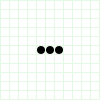 |
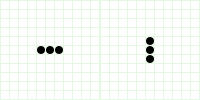 |
1,2個はすぐになくなりますが、3個は振動します。 |
| 4 | 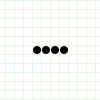 |
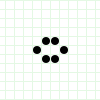 |
この形で止まります。 |
| 5 | 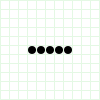 |
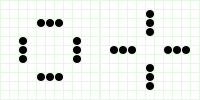 |
再び振動します。 |
| 6 | 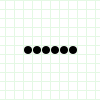 |
 |
死に絶えます。始めの数が多くても最終的に広がるとは限りません。 |
| 7 | 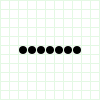 |
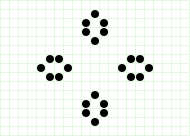 |
この形で止まります。 |
| 8 | 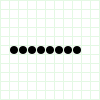 |
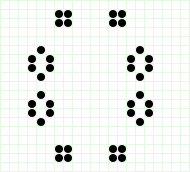 |
この形で止まります。 |
| 9 | 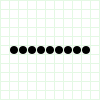 |
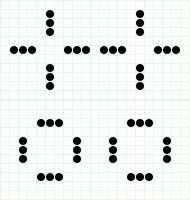 |
再び振動します。 |
ライフゲームは簡易ですが、食べ物に余裕があると増え、増えすぎると衰退するという自然界の現象からモデルを作ってシミュレーションするものです。初期値が少し違うだけで結果が大きく異なることも感じることができたでしょうか。
実際の研究ではもっと精密で複雑なモデルをつくりますが、どういうモデルを作るか、どういうルールを採用し、どういう初期状態から始めるかで結果が違いますから、実際の現象をシミュレートするにはよくよく研究し検証しなければなりません。コンピュータでシミュレーションをやっただけで結果を信用するのは危険です。